Case Study — Planera
Integrating AI into construction scheduling workflows.
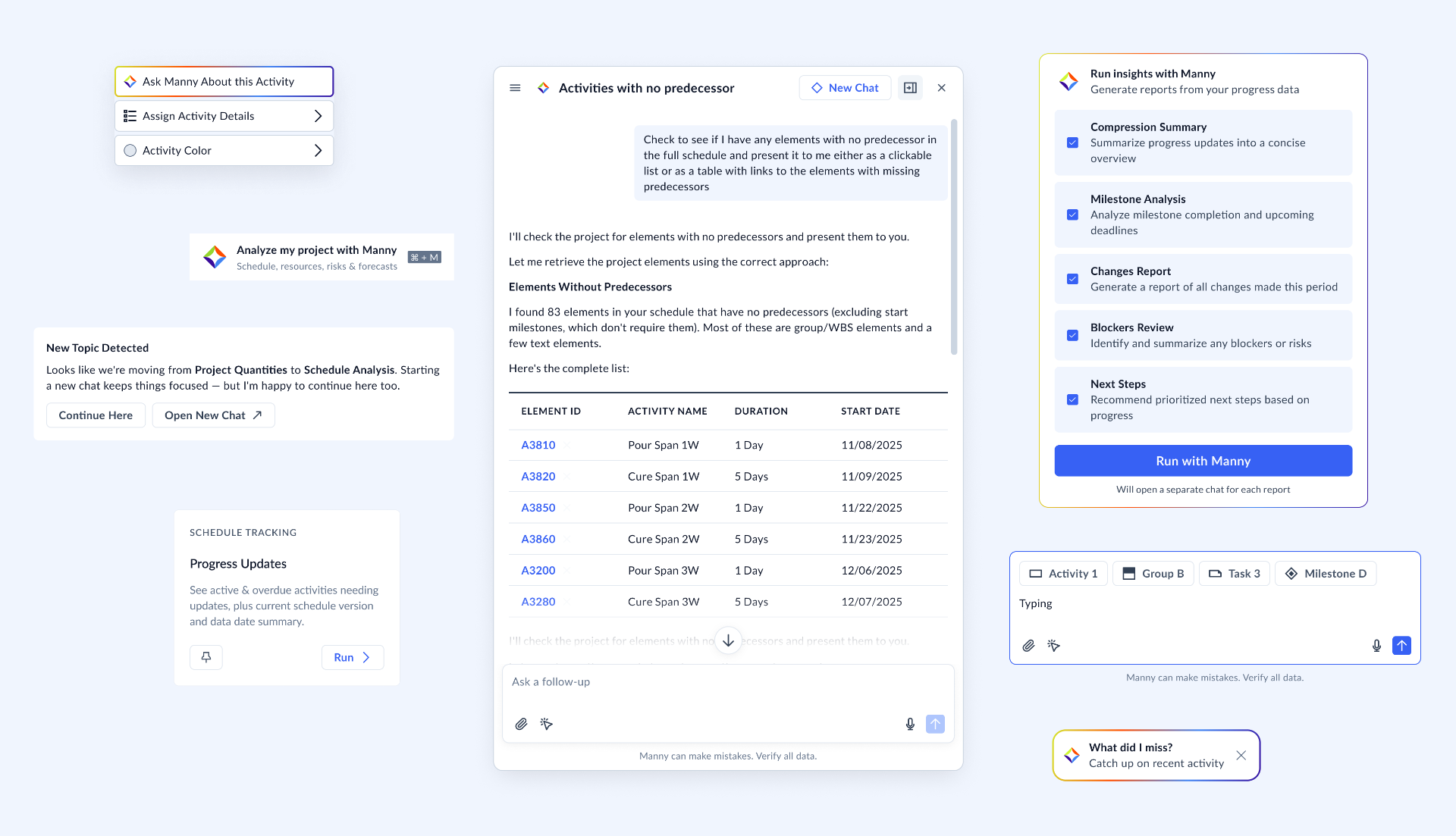
Planera is a construction scheduling platform used by schedulers, project managers, and superintendents to plan, track, and coordinate complex building projects. At the center of the product is a network of thousands of interdependent activities, the critical path that determines what happens when, and how a single delay ripples through trades, milestones, and contracts. The challenge wasn't adding AI to a product. It was integrating AI into an existing professional workflow, one where schedulers reason about those interdependencies every day and where the cost of a wrong recommendation is measured in weeks of delay. My work focused on expanding AI across the product, improving existing features rather than keeping it contained to a chatbot assistant in a floating window.
- Role
- Staff Product Designer
- Timeline
- 2026
- Industry
- Construction Tech
- Focus
- Scheduling — AI in workflows
Context
Construction scheduling is unforgiving.
A construction schedule can hold thousands of interdependent activities. A single change ripples through the critical path, downstream trades, and stakeholder commitments. Schedulers, project managers, and superintendents spend most of their day reasoning about those ripples.
Planera already had a conversational AI assistant when I joined. It could answer questions in isolation, but it had limited knowledge of what the user was looking at, what the project was about, or what had just changed.
My Role
Staff Product Designer on the AI surface area.
I partnered with product leadership, engineering, and customer-facing teams to define how AI fits into the existing scheduling experience. The work covered interaction models, workflow design, and the structure of four connected features: context selection, the Prompt Library, the Project Brief, and the Progress Update Agent.
Constraints
What made this hard.
Most of the design problems weren't visual. They came from the realities of the domain and the people working inside it:
- — Low trust in AI-generated recommendations on consequential decisions.
- — Users often come from construction, not software, they aren't always highly tech-savvy, and they aren't always AI-savvy either.
- — Scheduling mistakes carry real cost, delayed trades, missed milestones, contractual exposure.
- — CPM scheduling logic is unforgiving; a recommendation that ignores it is worse than no recommendation.
- — Users live inside the schedule itself. Anything that pulls them out of it has to earn that cost.
- — Automation had to support the scheduler's judgment, not replace it.
01
Context selection.
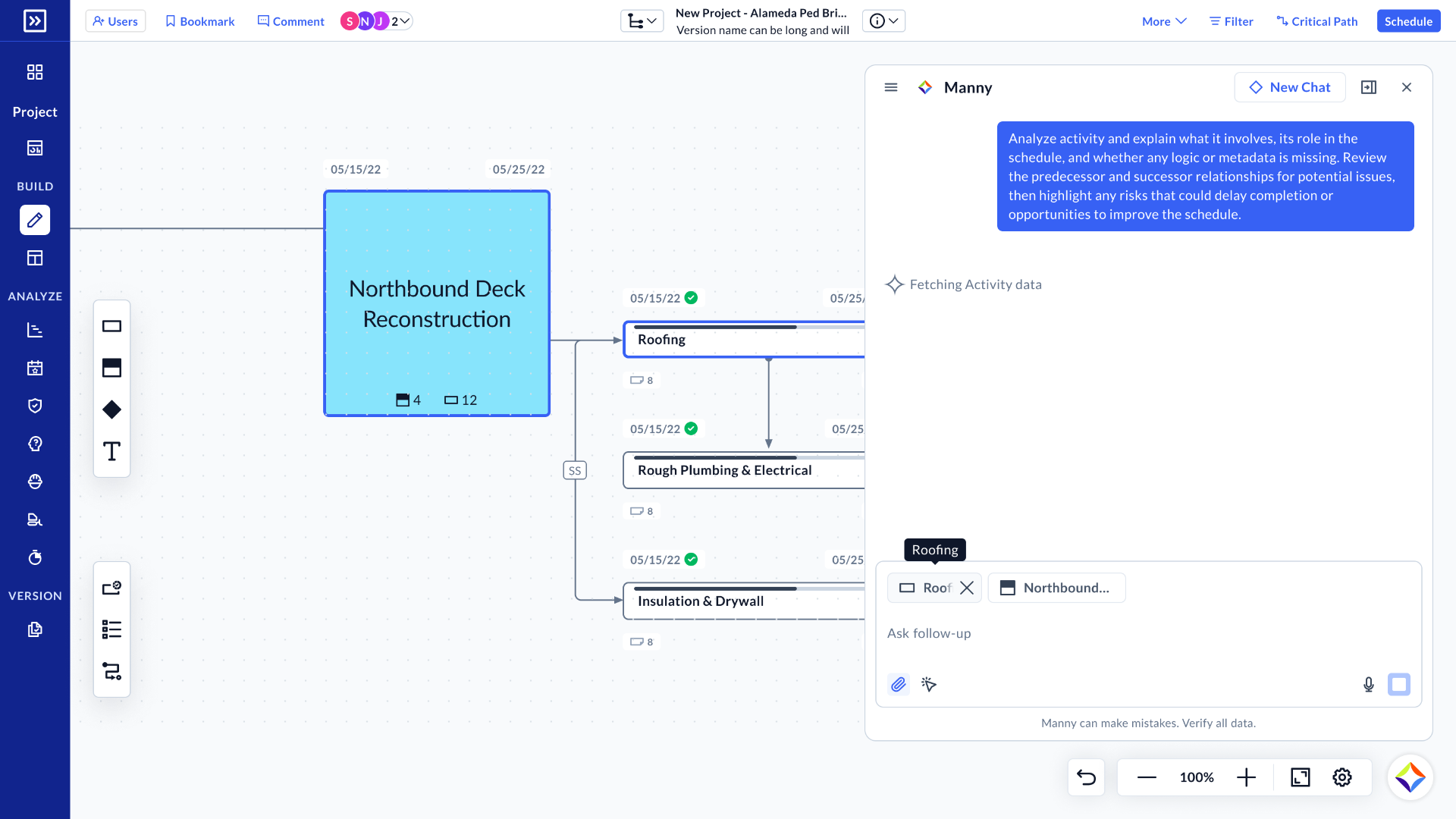
The first problem was simple to describe and hard to solve: the AI panel and the schedule were two separate places. Users could ask questions, but had no natural way to say "I mean these activities, on this part of the schedule, in this view."
I designed a few different paths to bring schedule context into a conversation, selecting activities directly from Canvas or Gantt, launching AI actions from contextual menus, and adding schedule objects as structured context inside a thread. The goal wasn't to make the assistant smarter in the abstract; it was to make the question the user is actually asking legible to the system.
02
Prompt Library.
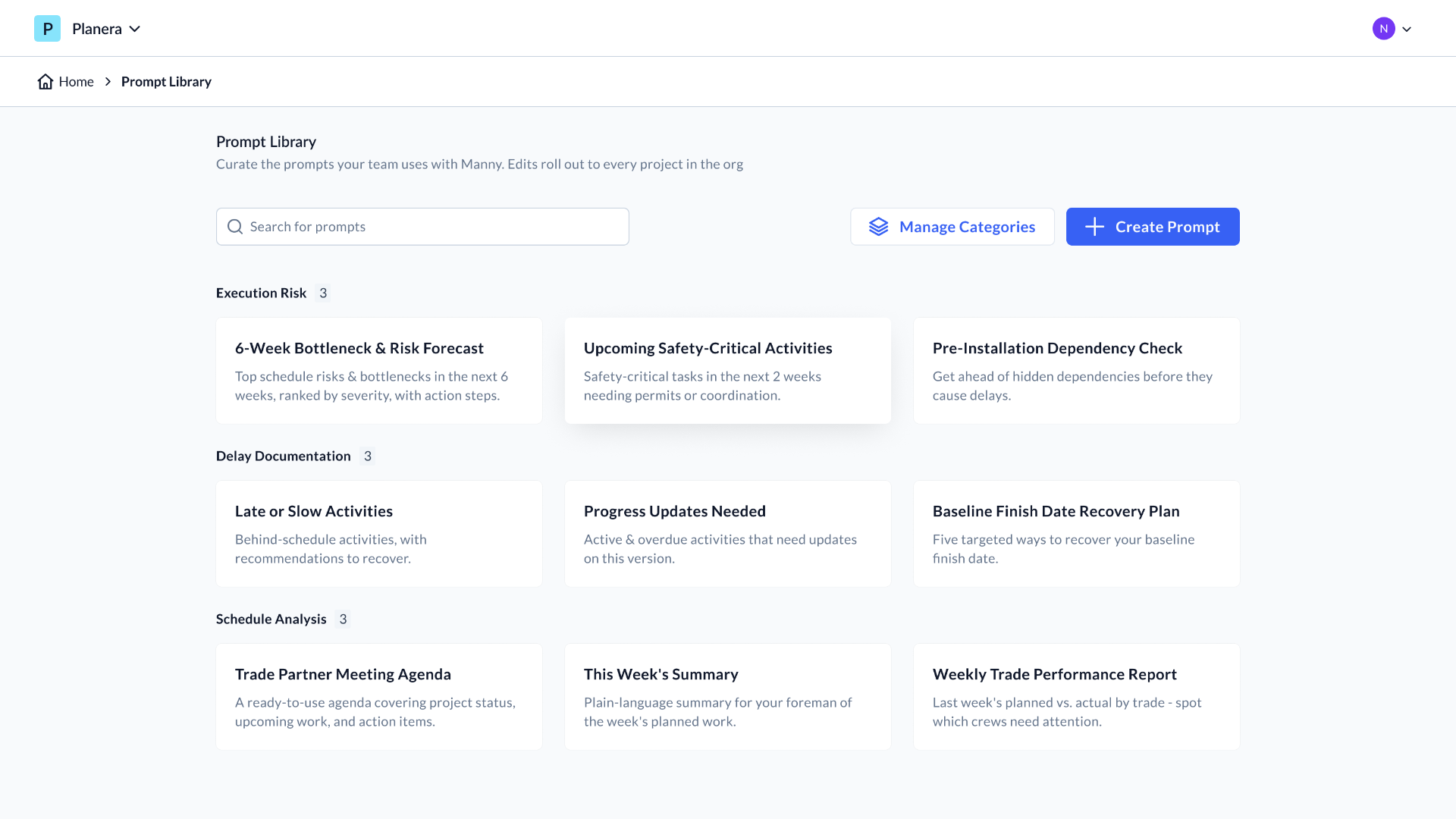
Context selection solved one half of the problem; the other half showed up in early testing. Users opening Manny for the first time hit a cold start, a blank input, an unfamiliar assistant, and no clear sense of what to ask or how to phrase it. Confidence, not capability, was the bottleneck.
The Prompt Library was the answer. Every organization starts with a curated set of default prompts grouped by category, execution risk, delay documentation, schedule analysis, that admins can edit to match how their teams actually work. Project users can also save their own prompts. New users get a running start; experienced users get a shared vocabulary.
I designed it to be evolutive. The same structure that powers per-org curation today opens the door to a prompt marketplace later, prompts shared across organizations, packaged by trade or project type, the way templates already move through the industry.
03
Project Brief.
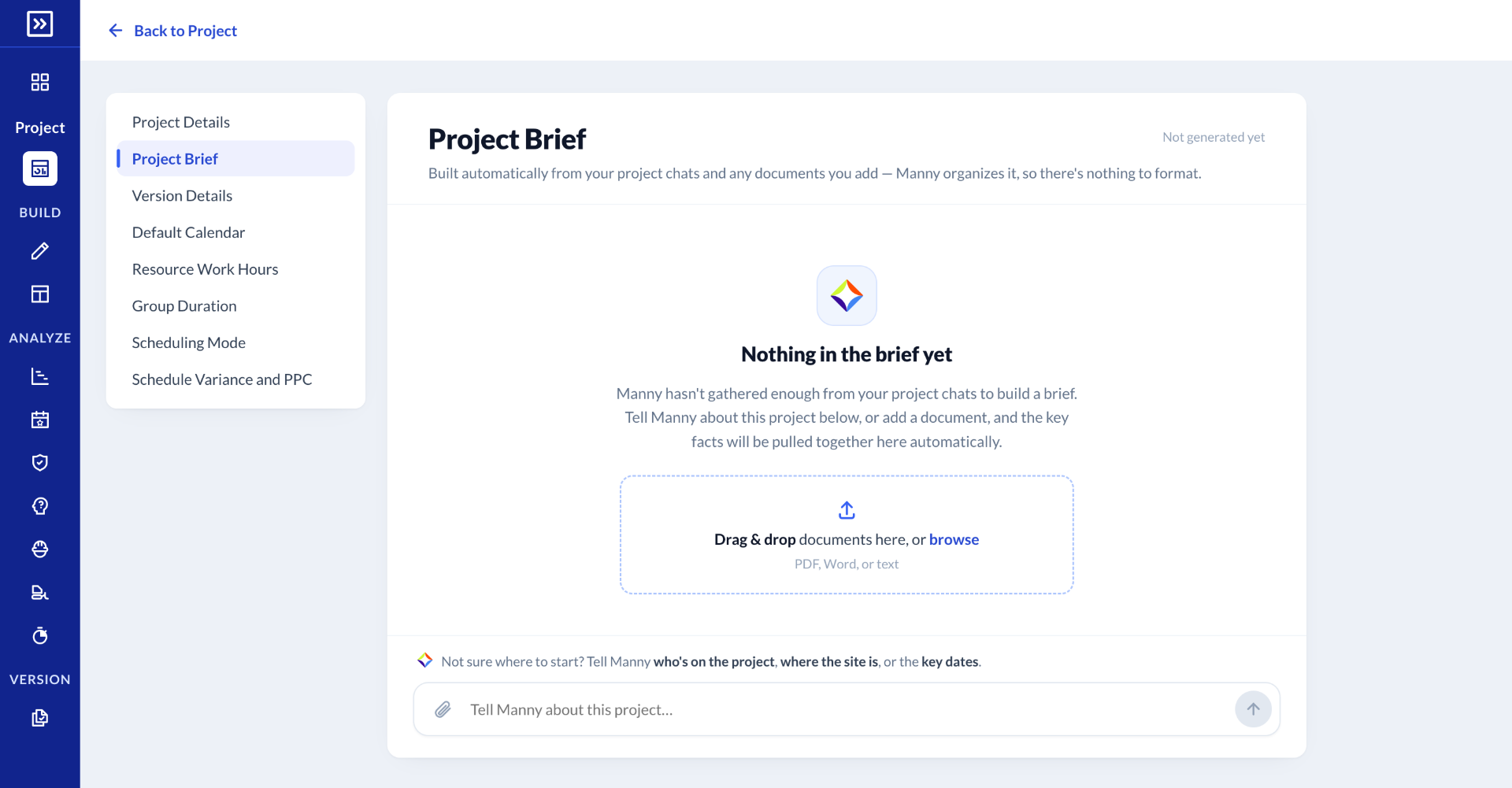
The next problem was about shared memory. The assistant was quietly accumulating information across conversations and documents, but none of it was visible. Users couldn't see what it knew, correct what it got wrong, or decide what mattered.
Instead of treating AI memory as a setup task, a form to fill out once and forget, I designed it as a living Project Brief that the user and the assistant co-edit over time. Making memory visible changed the tone of the relationship: less black box, more shared document.
04
Progress Update Agent.
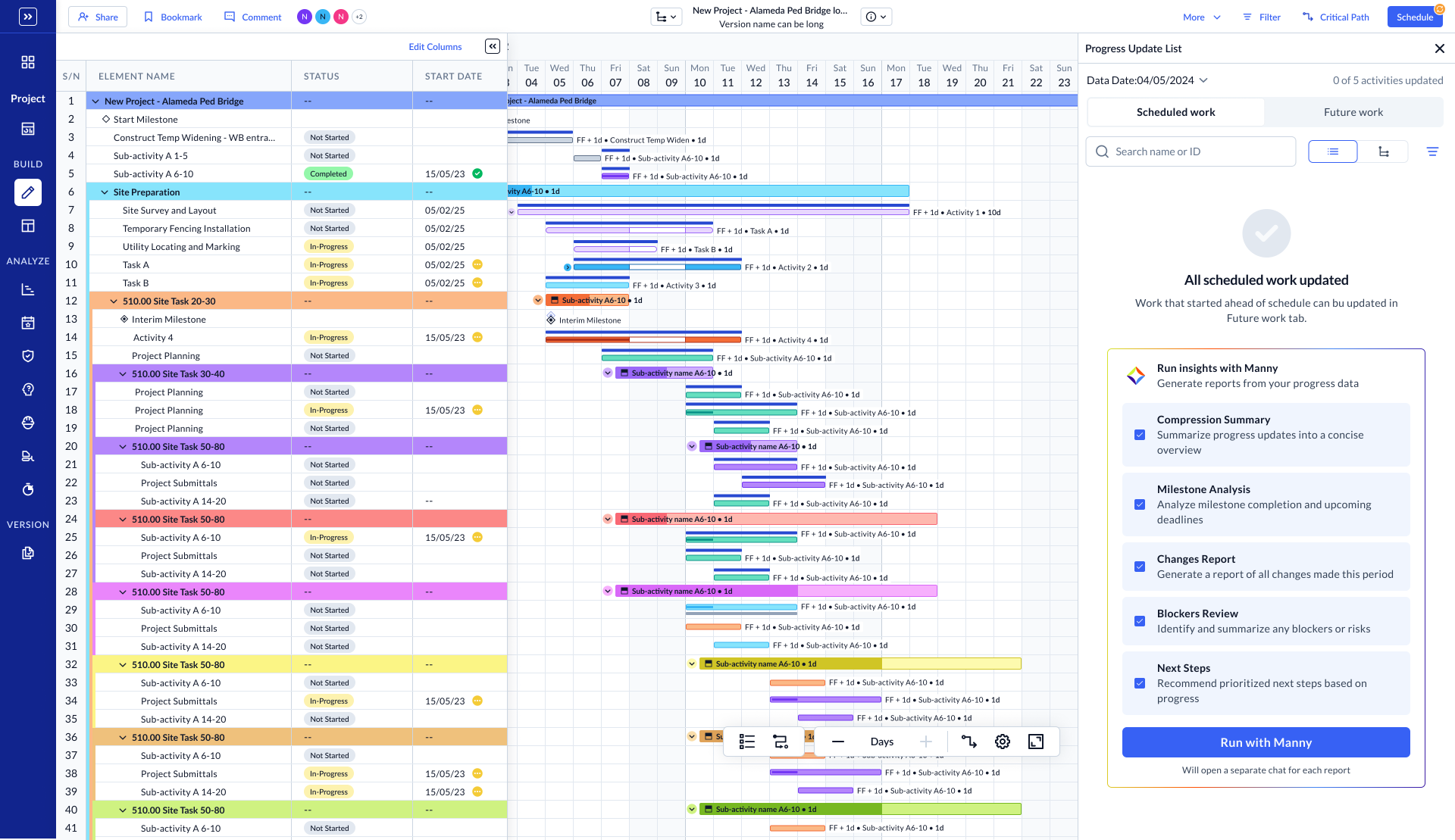
We also explored a Progress Update Agent that drafts a structured update from schedule changes, progress, variance, critical path impacts, risks, and hands it to the scheduler to review, edit, and send. The AI does the assembly; the human stays accountable for what goes out.
Reflection
What I took from the project.
A few things became clearer to me through this work. AI is most useful when it reduces the assembly work around a decision, not when it tries to make the decision. Memory has to be visible to be trusted. And the right unit of design is rarely "the assistant", it's the workflow the assistant is trying to support.
Next case
Maxa — helping finance teams make better decisions.